Instead of checking odometers and chasing appointments manually, build a fleet vehicle detailing mileage schedule that flags due vehicles and creates a booking request for approval. Use mileage to trigger the review, then confirm the vehicle’s condition, service scope, and appointment before treating the job as booked.
- A fleet vehicle detailing mileage schedule should trigger a service review, not an unconfirmed appointment.
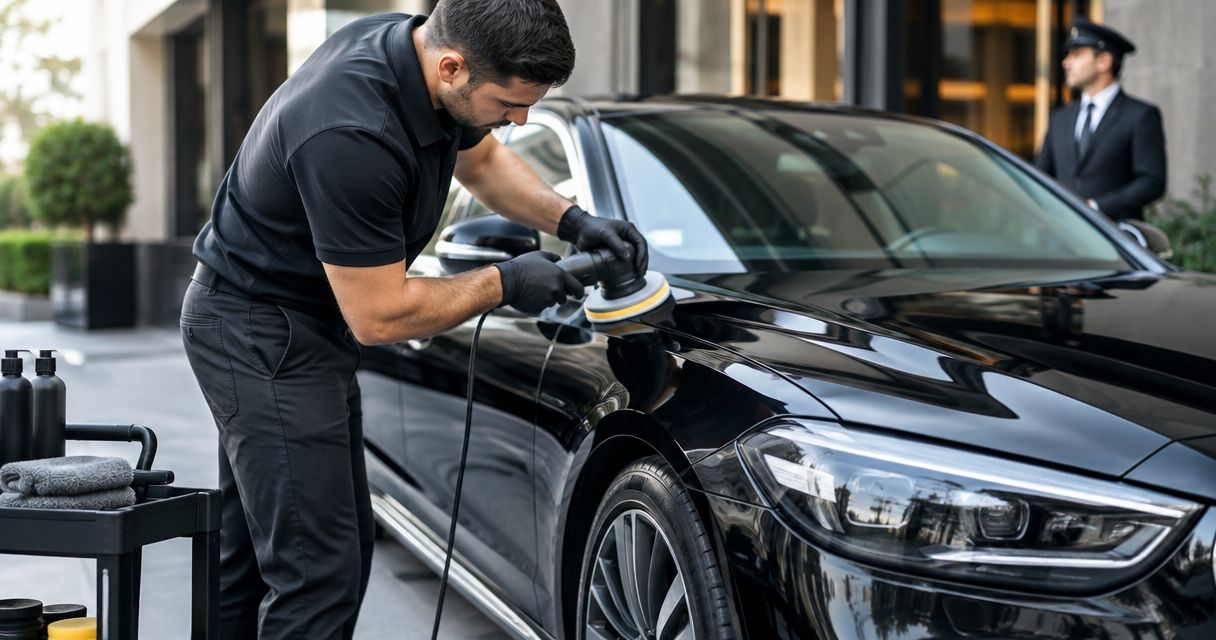
- Jmattdetailing provides mobile detailing, paint correction, and ceramic coating; confirm the combined service scope before booking.
- Keep odometer readings, completed-service mileage, and open requests together to prevent duplicate reminders.
- Assess paint correction and ceramic coating by paint condition and preparation needs, not mileage alone.
Why this matters
A mileage reminder answers one question: has this vehicle reached your chosen review point? It does not tell you whether the paint needs correction, whether an existing coating needs attention, or whether a suitable work location is ready.
Jmattdetailing is best for NH Seacoast vehicle owners seeking mobile detailing with a discussion about paint correction and ceramic coating. Start with Jmattdetailing to discuss the vehicle and proposed work location; do not assume a fleet booking system or automated scheduling connection exists.
For your 2026 fleet plan, separate automatic detection from appointment confirmation. That distinction keeps a useful reminder from becoming a booking nobody has accepted.
Before you start
- Access and ownership: Identify who can read odometer records, edit the fleet register, approve work, and receive booking requests. Use a spreadsheet, fleet system, or database that supports your intended automation.
- Vehicle and service records: Gather a stable vehicle ID, current odometer reading, reading date, last completed-service mileage, chosen mileage interval, and the person responsible for each vehicle. Record existing coating information when known.
- The gotcha: An odometer update can trigger the same rule repeatedly. Your workflow needs an open-request check before it sends another message, and it must not reset the service baseline until work is completed.
This guide describes configuration logic rather than a connection to a named application. The bold field names below are labels you create in your own system, not claims about an existing provider’s interface. Check that your selected system supports record updates, conditions, notifications, and persistent request status before building the workflow.
Vehicle register configuration
The register is your source of truth. Keep mileage reminders and paint-condition notes in the same vehicle record, but do not treat them as interchangeable evidence.
- Create a Vehicle ID field that stays with the vehicle when drivers change. Use it to match readings, requests, and completed jobs.
- Add Current Odometer, Reading Date, and Distance Unit. Keep miles and kilometers distinct; never compare readings with different units.
- Add Last Completed Service Odometer and Review Interval. The interval is your operating decision, not a universal detailing recommendation.
- Add Distance Since Service, calculated as current odometer minus last completed-service odometer. Add Next Review Odometer, calculated as last completed-service odometer plus review interval.
- Add Condition Notes, Requested Scope, Approver, and Work Location. Describe visible concerns without diagnosing the required correction from photographs alone.
- Add Request Status and Request ID. Define the status values Not Due, Needs Review, Requested, Confirmed, and Completed.
Expected result: Each vehicle has a readable mileage baseline, a review point, and a place to track an unresolved request.
Before importing your full 2026 register, check that older completed-service records refer to comparable work. An interior cleaning does not establish when paint correction was last performed. Store different service histories separately where that distinction affects your decisions.
Choose the right trigger for the work
Mileage and condition serve different purposes. Choose the rule that matches the question you need answered.
| Review option | Best for | Advantage | Limitation |
|---|---|---|---|
| Mileage-triggered review | Vehicles with consistent distance records | Uses a measurable operating milestone | Does not measure paint defects or cabin condition |
| Condition-triggered review | Visible swirls, staining, contamination, or finish concerns | Responds to the vehicle’s actual appearance | Requires someone to inspect and document concerns |
| Combined review | Owners considering correction and coating together | Connects usage history with preparation and finish decisions | Needs human assessment and agreed service scope |
Use the combined review for paint correction and ceramic coating enquiries. Mileage can prompt the conversation; the vehicle’s condition determines what needs discussing. Correction addresses paint defects, while coating adds protection to a prepared surface. Neither should be assumed to be included in the other.
Mileage trigger configuration
Configure the automation around a record change or a scheduled review, depending on what your system supports. A trigger is only as current as the readings it receives.
- Select the vehicle register as the source. Run the rule when an odometer reading changes, or evaluate the register on your chosen review schedule.
- Reject records with a missing Vehicle ID, missing baseline, incompatible distance units, or a current reading below the previous accepted reading. Route these records to a person instead of sending a booking request.
- Set the due condition to Current Odometer greater than or equal to Next Review Odometer. Do not require an exact match: a vehicle can pass the threshold between readings.
- Check Request Status before continuing. Stop when the vehicle already has a Requested or Confirmed job; update the existing request instead of creating another.
- Set Request Status to Needs Review and notify the Approver. Include the vehicle ID, reading date, mileage since completed service, and condition notes.
- Test 3 cases: a vehicle below its threshold, a vehicle at or above it, and a due vehicle with an open request. Only the eligible due vehicle should produce a new review notification.
Expected result: A qualifying mileage update produces one review task, while incomplete records and existing requests take separate paths.
Keep the 2026 test records clearly marked and separate from live booking messages. A successful test proves the rule works; it does not prove that the provider has accepted an appointment.
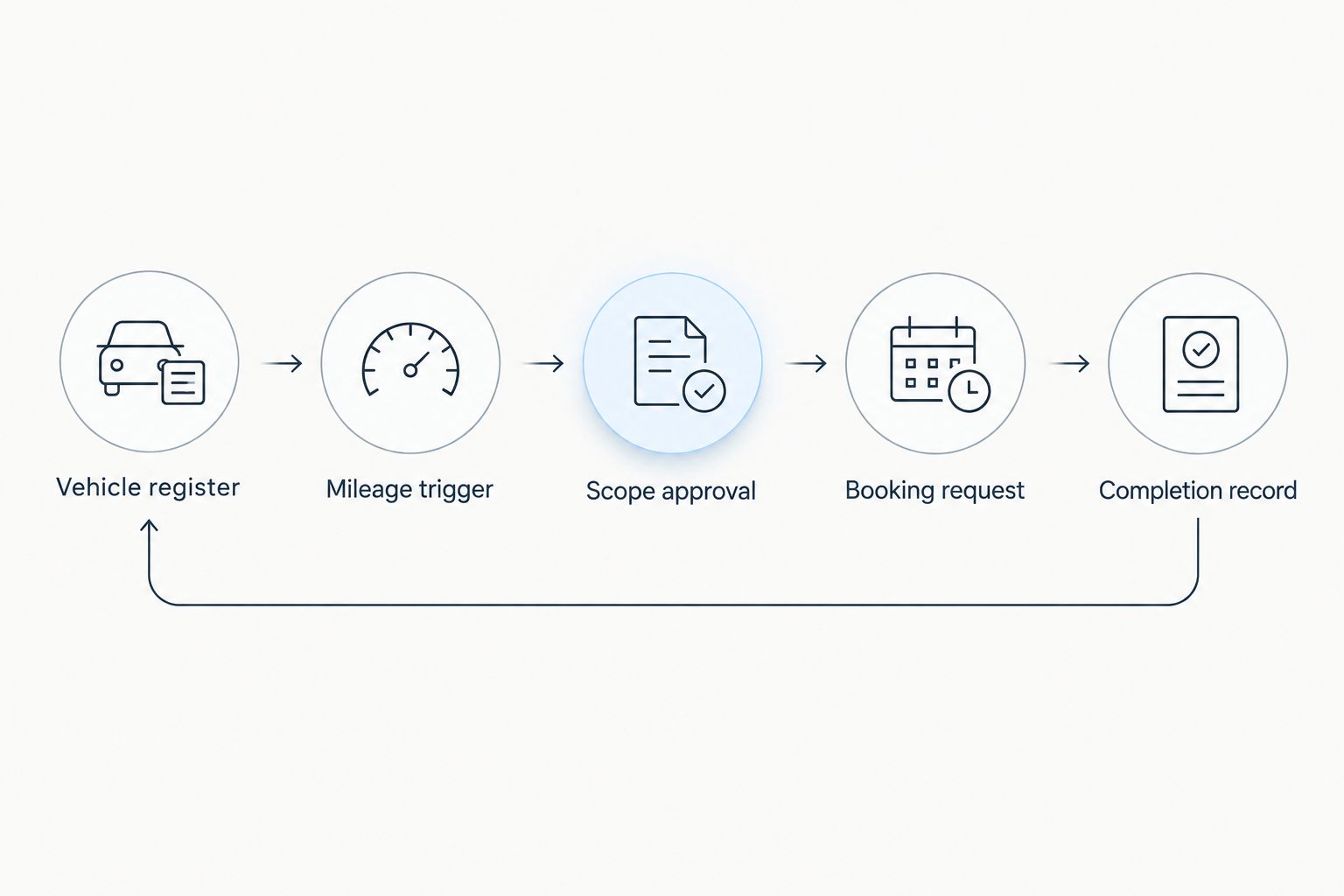
Scope approval and booking request configuration
The approval stage turns a mileage event into a useful service enquiry. It also protects you from requesting paint correction repeatedly just because a vehicle covers distance quickly.
- Have the approver review Condition Notes alongside the mileage alert. Ask whether the concern is routine cleaning, paint defects, coating care, or an assessment for combined correction and coating.
- Write the requested work in Requested Scope. Use wording such as assessment for paint correction and ceramic coating rather than assuming a named package or included preparation steps.
- Confirm the proposed Work Location, vehicle access, and the periods when the vehicle can be taken out of use. Ask the provider what workspace and conditions the proposed work requires.
- Generate a booking request through a communication method the provider accepts. Include the vehicle ID, vehicle details, concerns, proposed location, scheduling constraints, and an appropriate contact person.
- Save the outbound message reference in Request ID and set Request Status to Requested. Change it to Confirmed only after the appointment and service scope are accepted.
Expected result: The approver receives a clear decision, and the provider receives a usable enquiry rather than a bare mileage alert.
Jmattdetailing’s mobile service brings the service discussion to your proposed location, but you still need to confirm that location and the work involved. Ask about preparation and the intended finish, not just the appointment date. For combined work, read whether paint correction and ceramic coating can be done in one visit before setting vehicle-release expectations.
For an Exeter enquiry, state the actual address and requested work. For Rye, North Hampton, NH, or Newburyport, MA, ask whether the proposed location is covered; a nearby town name is not confirmation of service coverage.
Discuss correction and coating together
Share your vehicle’s condition and proposed location, then confirm the preparation and service scope.
Completion record configuration
Close the loop after the appointment, not when the reminder fires. Otherwise, a postponed or canceled visit can disappear from the due list.
- Require confirmation of completed work before setting Request Status to Completed. Record the completion date and what was actually performed.
- Update Last Completed Service Odometer with the reading associated with that completed service. Do not substitute the mileage from the original request without checking it.
- Recalculate Next Review Odometer using the interval approved for that service category. Keep correction and coating history distinct from routine cleaning history.
- Retain the previous Request ID in the service history, then clear the active request reference. Return the active status to Not Due only when the updated record supports it.
- Record any care instructions supplied for the work performed. Use those instructions when planning later cleaning or assessing another service request.
Expected result: The next reminder starts from completed work, and the history explains what happened to the previous request.
For your 2026 completion log, include the person who closed the job. That creates a clear handoff when a driver, dispatcher, and vehicle owner all participate in the same request.
Trigger a review whenever vehicle condition changes
A second workflow catches concerns that mileage cannot detect. Use it when a driver reports a new finish problem or the vehicle is being prepared for a different role.
- Add Condition Review Needed and Condition Report Date to the vehicle record.
- Trigger a review when Condition Review Needed changes to yes. Include photographs where useful, but ask for an assessment rather than prescribing a correction process.
- Check for an open request before notifying the approver. Attach the new concern to that request if one exists.
- Clear the flag after the concern is reviewed and record the decision. Do not reset the mileage baseline unless relevant work is completed.
Expected result: A condition report reaches the approver without waiting for the next mileage threshold or creating a competing booking.
The benefit is responsiveness. The trade-off is judgment: someone must distinguish a cleaning concern from a paint defect and decide when professional assessment is appropriate.
Troubleshooting
- The same vehicle generates repeated requests. Check the open-request condition and save the request reference before another run can process the vehicle. If your system supports it, prevent overlapping runs for the same vehicle ID.
- A vehicle passes the limit without an alert. Replace an exact-mileage comparison with greater-than-or-equal logic. Check the reading date, trigger history, and whether the record was excluded because required fields were empty.
- A completed job immediately becomes due again. Verify that completion updated the correct baseline and service category. Confirm that the interval and odometer use the same distance unit.
- A reminder appears, but no appointment exists. A notification is not provider acceptance. Keep the request unresolved until someone records the accepted appointment and scope.
- Correction is requested after every mileage interval. Change the automatic output to a condition review. Do not equate distance traveled with a need for repeated paint correction or coating application.
Customize your workflow
Start your 2026 rollout with one approval route and one request owner. Add more routing only when the register and completion process work reliably.
For Jmattdetailing mobile detailing enquiries, keep the request focused on the vehicle’s condition, the proposed location, and whether you want correction and coating assessed together. Mobile convenience matters, but preparation and the intended finish belong in the same conversation.
You can also group due vehicles by proposed location for an internal review. Do not convert that group into a confirmed service day without agreement. Grouping helps you organize enquiries; it does not establish provider capacity, site suitability, or service scope.
FAQ
How do I automate a fleet vehicle detailing mileage schedule?
Create a vehicle register, compare current mileage with a chosen review threshold, and generate an approval task when the threshold is reached. Check for an open request before sending another message, and confirm the appointment separately.
What mileage interval should I use for fleet detailing?
Choose an interval based on your vehicles’ use and an agreed review plan, not a universal detailing mileage figure. Use condition reports alongside mileage, especially when considering paint correction and ceramic coating.
Can a mileage alert automatically book mobile detailing?
Only treat an appointment as booked when the provider has accepted it through an agreed process. Without that arrangement, automate the request and track confirmation as a separate step.
Should paint correction and ceramic coating happen at every mileage limit?
No, a mileage limit should trigger a review rather than automatically prescribe correction and coating. Confirm the paint condition, preparation needs, existing coating information, and proposed service scope first.
Can I request combined correction and coating in Exeter?
Jmattdetailing lists Exeter within its NH Seacoast service area and provides paint correction and ceramic coating services. Confirm your address, vehicle condition, and the actual combined scope before booking.
Can I use this workflow for vehicles in Rye, North Hampton, or Newburyport?
Yes, you can use the internal tracking workflow for vehicles in those towns. Confirm provider coverage for the actual work location before requesting an appointment; the tracking setup does not establish service coverage.
When should I reset the mileage reminder after detailing?
Reset the relevant service baseline after the work is completed and the completion reading is recorded. Sending a request, approving work, or confirming an appointment does not establish a completed-service baseline.
One last thing
The completion record matters more than the reminder. A missed reminder is visible when you check the due list; an incorrectly reset baseline can make unfinished work look current. Make completion confirmation a required handoff, especially when several people share responsibility for a vehicle.